AI Photo Decluttering

AI Photo Decluttering for Property Photos

PhotoClear removes cars, bins, cables, clutter and unwanted objects from real estate photos in seconds — so every listing image looks clean, spacious and ready to sell.

Start free with 10 credits — no card required

PhotoClear AI immersive experience preview

Overview

What is PhotoClear AI?

PhotoClear is an AI-powered photo decluttering tool built specifically for property marketing. It identifies and removes distracting objects from real estate photography — then realistically rebuilds the background behind them — without manual masking or Photoshop skills.

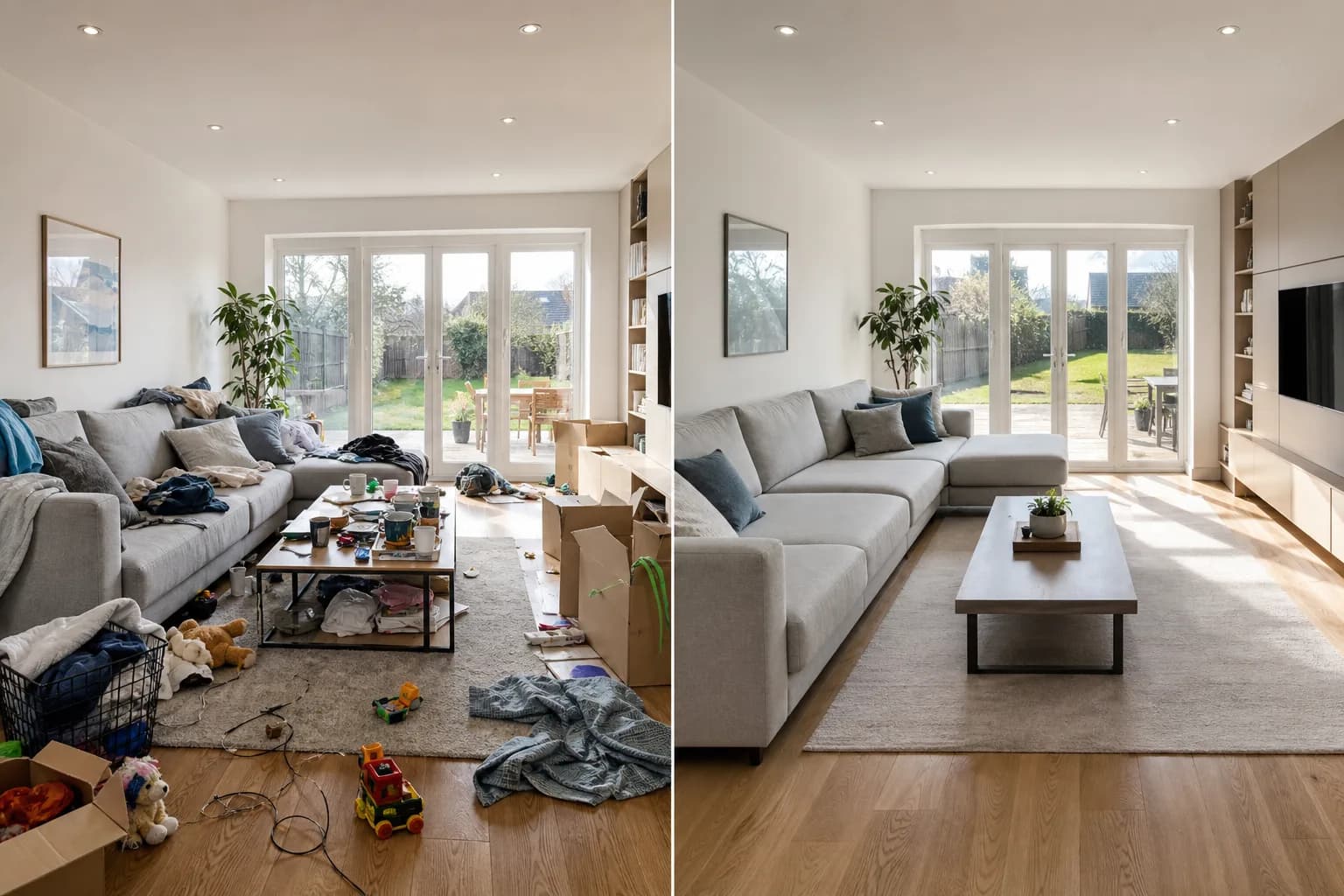
Property photos rarely come out of the camera clean. There is a wheelie bin on the drive, cars parked across the frontage, cables snaking across the ceiling, washing on the line, toiletries around the bath and a tangle of toys on the living room floor. Each one pulls a buyer’s eye away from the space you are actually trying to sell. PhotoClear uses generative AI to remove those distractions and reconstruct what should be behind them — brickwork, tarmac, sky, flooring or wall — so the result looks like the clutter was never there.

Traditional decluttering means hours in Photoshop with the clone stamp, content-aware fill and patient masking, or paying an external editor and waiting overnight for a return. PhotoClear collapses that into a brush-and-go workflow: highlight what you want gone, and the AI removes it and fills the gap in a few seconds. There is nothing to install, no subscription to commit to, and the same credits work across every ReHub Studio app.

Because PhotoClear is part of the ReHub Studio platform, decluttering is rarely the last step. A cleaned image flows naturally into HDR enhancement, twilight conversion, virtual staging or a cinematic listing video — all from the same login and the same credit balance.

Who it’s for

PhotoClear is for estate agents, property photographers, lettings agents, developers and marketing teams who need clean, professional listing images quickly — without learning photo-editing software or outsourcing every shot.

Problems it solves

  • Cars and vans parked across a property frontage
  • Wheelie bins, recycling boxes and rubbish bags
  • Cables, wires, satellite dishes and visible TV leads
  • Personal clutter — toiletries, laundry, toys, paperwork
  • For-sale boards, signage and reflections
  • Slow, expensive manual editing and outsourced turnaround

Typical use cases

  • Cleaning up frontage shots before a listing goes live
  • Removing personal items for tenant or owner privacy
  • Tidying interiors for a more spacious, neutral feel
  • Batch-cleaning a full property shoot before HDR or staging
  • Refreshing tired listings without a re-shoot

Key features

Everything PhotoClear does

The features that make PhotoClear AI the fastest way to AI photo decluttering.

Brush-to-remove object removal

Paint over anything you want gone — a car, a bin, a cable — and PhotoClear removes it, then regenerates a believable background in its place.

Benefit: No masking, layers or clone-stamp skill required. If you can highlight an object, you can delete it.

e.g. An agent brushes over two cars on a driveway and a recycling box; seconds later the frontage shows clean block paving.

Remove cars and vehicles

Purpose-tuned for the most common property problem: vehicles parked across drives, kerbs and frontages that hide the property and date the photo.

Benefit: Showcase the property and its kerb appeal instead of someone’s parking.

e.g. A terraced-house frontage cluttered with three parked cars becomes a clean street view that highlights the bay window.

Remove bins, rubbish and signage

Strip out wheelie bins, recycling boxes, bin bags, for-sale boards and stray signage that make exteriors look untidy.

Benefit: Exteriors read as cared-for and premium, raising perceived value.

e.g. A side return with three overflowing bins is cleaned to show the original paving and fence line.

Remove cables and wires

Erase trailing TV leads, charger cables, satellite wires and ceiling cabling that clutter interior shots.

Benefit: Rooms look finished and intentional rather than mid-renovation.

e.g. A living-room corner with visible TV and console cables is tidied to a clean wall and skirting.

Realistic background reconstruction

PhotoClear doesn’t just blur — it generates new pixels that match surrounding texture, lighting and perspective so removals are invisible.

Benefit: Edits hold up under scrutiny on portals, brochures and large screens.

e.g. Removing a parked van rebuilds the brick wall and pavement behind it with matching mortar lines.

Batch and multi-object cleanup

Clear several objects in a single image and move quickly through a full property set in one session.

Benefit: A whole shoot is listing-ready in minutes, not an evening of editing.

e.g. A photographer cleans bins, cars and a stray ladder across twelve exterior frames before delivery.

Resolution-preserving output

Images are processed and returned at original dimensions and aspect ratio, ready for portals and print.

Benefit: No awkward crops or quality loss between upload and download.

e.g. A 6000×4000 exterior comes back at the same size, sharp enough for a printed brochure.

Seconds, not overnight

Removals complete in seconds in the browser, replacing outsourced editing queues entirely.

Benefit: List faster and react to last-minute changes the same day.

e.g. A vendor asks to remove a neighbour’s car before going live; it’s done before the call ends.

Privacy-friendly cleanup

Remove personal items, faces in windows, number plates and identifying details to protect occupants.

Benefit: List tenanted or occupied homes responsibly and compliantly.

e.g. A tenant’s family photos and a visible number plate are removed before the listing publishes.

Connected to the ReHub workflow

Cleaned images flow straight into HDR, twilight, virtual staging and video without re-uploading.

Benefit: One platform, one credit balance, one consistent look across every asset.

e.g. A decluttered exterior is converted to dusk in HyperDusk and animated in ImageMotion the same afternoon.

Who it’s for

Built for the way you market property

Estate Agents

Win instructions with sharper listing photography and get properties live faster. Remove the parked cars and bins that hold a listing back without booking a re-shoot.

Property Photographers

Deliver cleaner sets in less time and add decluttering as a paid extra. Batch-clean an entire shoot before HDR and hand clients portal-ready images.

Developers

Present show homes and new-build exteriors free of site clutter, hoarding, skips and contractor vehicles while the development is still being finished.

Commercial Property

Clean up retail, office and industrial exteriors — removing fleet vehicles, bins and signage — for cleaner agency particulars and investment decks.

Marketing Agencies

Turn around client property imagery at scale with consistent quality, no outsourcing, and a predictable per-image cost.

Benefits

Why teams choose PhotoClear

Save hours per shoot

Replace manual Photoshop masking and overnight outsourcing with seconds-per-image cleanup you do yourself.

Cut editing costs

Pay-as-you-go credits cost a fraction of per-image editing fees, with no monthly retainer.

Better marketing performance

Clean, clutter-free photos earn more clicks and enquiries on Rightmove, Zoopla and portals worldwide.

Higher engagement

Distraction-free images keep buyers focused on the space and the features that sell.

Scales with your volume

Clean one frontage or a hundred — the workflow and per-image cost stay the same.

Works anywhere

Browser-based and language-agnostic, PhotoClear works for property professionals worldwide.

Workflow

How PhotoClear works, step by step

  1. 1

    Upload your photo

    Drag a property image into PhotoClear in the browser. JPEGs and PNGs at full listing resolution are supported.

  2. 2

    Brush over the clutter

    Paint over the cars, bins, cables or personal items you want removed. Highlight several objects at once.

  3. 3

    Let the AI rebuild the scene

    PhotoClear removes the objects and regenerates a realistic background in seconds.

  4. 4

    Refine if needed

    Touch up any area or remove an additional object until the image is exactly right.

  5. 5

    Download and continue

    Export at full resolution, or push the clean image straight into HDR, twilight, staging or video.

How it compares

PhotoClear vs the alternatives

PhotoClear vs Photoshop

Photoshop can remove almost anything in the right hands — but it demands skill, time and a licence. PhotoClear delivers the same clutter-free result without the learning curve.

PhotoClearPhotoshop
Skill requiredNone — brush and goMasking, clone stamp, layers
Time per imageSeconds5–30 minutes
Built for propertyYes — tuned for cars, bins, cablesGeneral-purpose
CostPay-as-you-go creditsMonthly subscription
Connected workflowHDR, twilight, staging, videoStandalone

PhotoClear vs outsourced editing

Outsourcing decluttering means uploading, briefing and waiting — often overnight — for each round of edits. PhotoClear puts that control in your hands instantly.

PhotoClearOutsourced editing
TurnaroundSeconds, in-houseHours to overnight
RevisionsInstant and unlimitedNew round each time
Cost per imageLow, predictable creditPer-image fee + admin
PrivacyStays on your accountShared with third party

FAQ

Frequently Asked Questions

AI photo decluttering uses generative artificial intelligence to remove unwanted objects from a photo — such as cars, bins, cables or personal items — and automatically rebuild a realistic background where they were. PhotoClear does this for property photos in seconds, without manual editing.

Pricing

Simple, shared credits

PhotoClear uses ReHub Studio’s shared, pay-as-you-go credit system. There is no subscription and no minimum spend — you buy credits and use them across every app in the platform.

See full pricing

Pay only for the images you clean — start with 10 free credits.

  • Every new account starts with 10 free credits — no card required.
  • Credits are shared across PhotoClear, HDRPhoto, HyperDusk, Virtual Staging, ImageMotion and more.
  • No monthly fee — top up when you need to and your balance carries over.
  • Credits are valid for 12 months from the date they are granted.

Ready to try PhotoClear AI?

Remove clutter from property photos in seconds with AI. Start free with 10 credits — no card, no commitment — and use them across every app in ReHub Studio.